Eglof Plugin
Eglof Plugin
Couldn't load pickup availability
"Eglof" is the word "Folge" spelled backwards, which is the German word for "sequence".
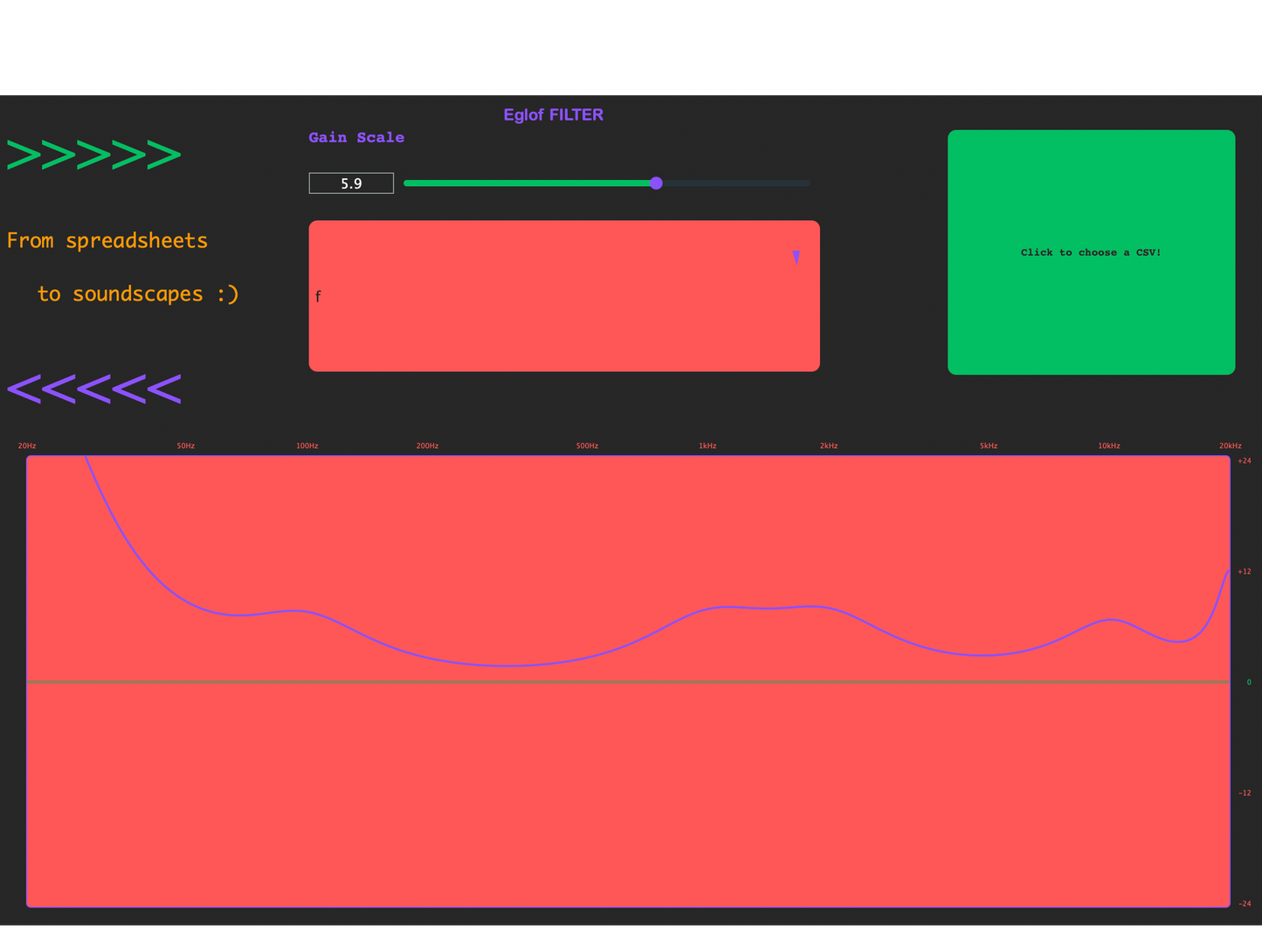
 Eglof is a filter plugin that allows for the choosing of up to 100 peaks or cuts, offering an alternative approach to EQ. The peaks correspond to values in the chosen column of an uploaded CSV file. Installation media are currently available for the AU format.
Make sure you have selected stereo input. Click on the "Click to choose a CSV" button and choose a CSV file from your device. Choose a column from the CSV Column -> Frequency Mapping dropdown. The data in the CSV file will be processed as floating-point numbers, which are then min-max scaled to correspond to peaks or cuts (depending on the value chosen via the gain slider) between 20Hz and 20kHz. Once you have chosen a CSV file, select one of its columns from the dropdown menu. You can adjust the factor by which the gains of the peaks are scaled to a factor betweek -24dB and +24dB using the slider. Adjust the slider slowly when increasing the gain or you may experience unexpected clipping! Large files may cause performance issues.
Consider the following CSV file with a single row and column:
| Platypus |
|---|
| 20 |
When the file is initially loaded and a column is chosen, the curve will be flat. 
Adjust the gain to a positive value to get a frequency boost around 20Hz lke so: 
Similarly the gain can be adjusted to a negative value to achieve the following result: 
Here's another example, where the CSV file has a mixture of data types:
| a | b | c | d | e | f | g |
|---|---|---|---|---|---|---|
| 1 | 2 | 3 | 4 | 25 | 1 | a |
| 3 | 4 | 5 | 6 | 100 | 10 | ab |
| 7 | 8 | 9 | 10 | 230 | 100 | abc |
| 11 | 12 | 13 | 14 | 997 | 1000 | abcd |
| 9 | 6 | 7 | 8 | 1234.5 | 10000 | @#$ |
| 5 | 10 | 1 | 2 | 3456.7 | 100000 | abcdef |
| 13 | 14 | 11 | 12 | 7890 | 1000000 | abcdefg |
| 15 | 16 | 13 | 14 | 12345.6 | 2 | 90 |
| 17 | 18 | 15 | 16 | 13579 | 20 | ** |
| 19 | 20 | 17 | 18 | 1990.9 | 2000 | 0 |
This is the resulting response curve when column f is selected:

Upon downloading and opening the disk image file (.dmg), you may receive an error indicating that installation has been blocked. This is because the plugin is not available in the app store.

In order to bypass this block, click 'Done', go to the Privacy & Security tab within System Settings and scroll down to Security. Here, you should see the option to make an excaption to allow the plugin to be installed. Likewise, you may also see a similar warning before downloading the .dmg file, which can be safely ignored.
Once installed, make sure that all plugins are rescanned.